Time Value of Money — Chapter 5
Move value through time: FV = PV(1+r)^n (compounding) and PV = FV/(1+r)^n (discounting).
All-in-One TVM Calculator
PV, FV, PMT, NPER, RATE, annuities, NPV/NFV, APR, and EAR in one separate app.
All-in-One Time Value of Money Calculator
Use one app for general TVM, ordinary and due annuities, NPV/NFV, and APR/EAR. Results, math, Excel formulas, and timelines update automatically.
1. General TVM Solver
Choose what to solve for: PV, FV, PMT, NPER, or RATE.
2. Flexible NPV and NFV
Enter signed cash flows at any time. Add or remove rows as needed. NPV is measured at time 0; NFV is measured at your chosen target time.
| Time | Cash flow ($) | |
|---|---|---|
3. APR and EAR Converter
Convert in either direction and see the periodic rate and compounding timeline.
See the Time Value of Money
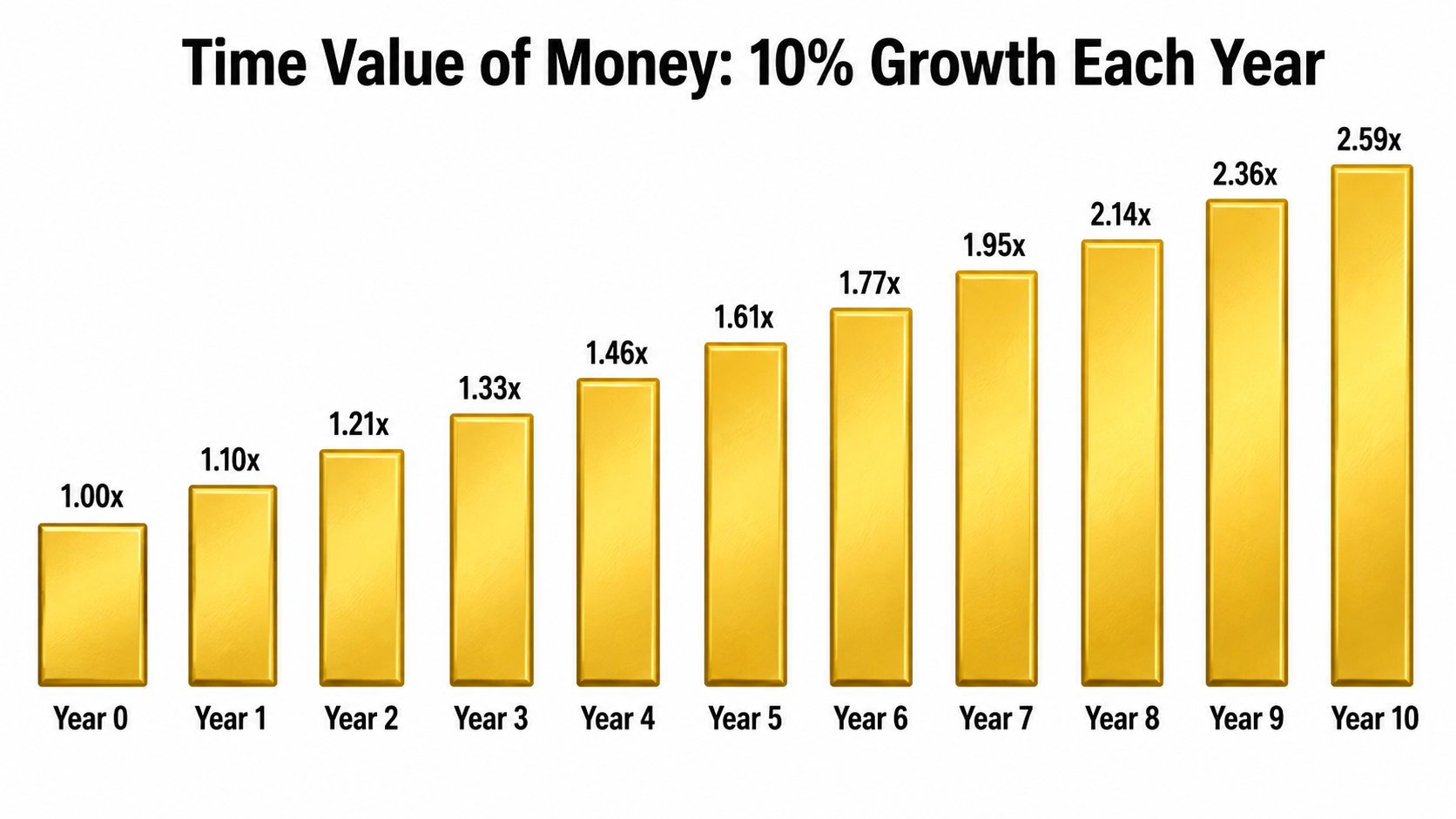
Time value of money means that money can change in value as time passes. If money earns a return, today’s dollar can grow into more than one dollar in the future. The pictures below make the roles of time (n) and the interest rate (r) visible before we calculate them.
FV = PV(1+r)^n →
each year’s interest becomes part of the balance and can earn interest in later years.
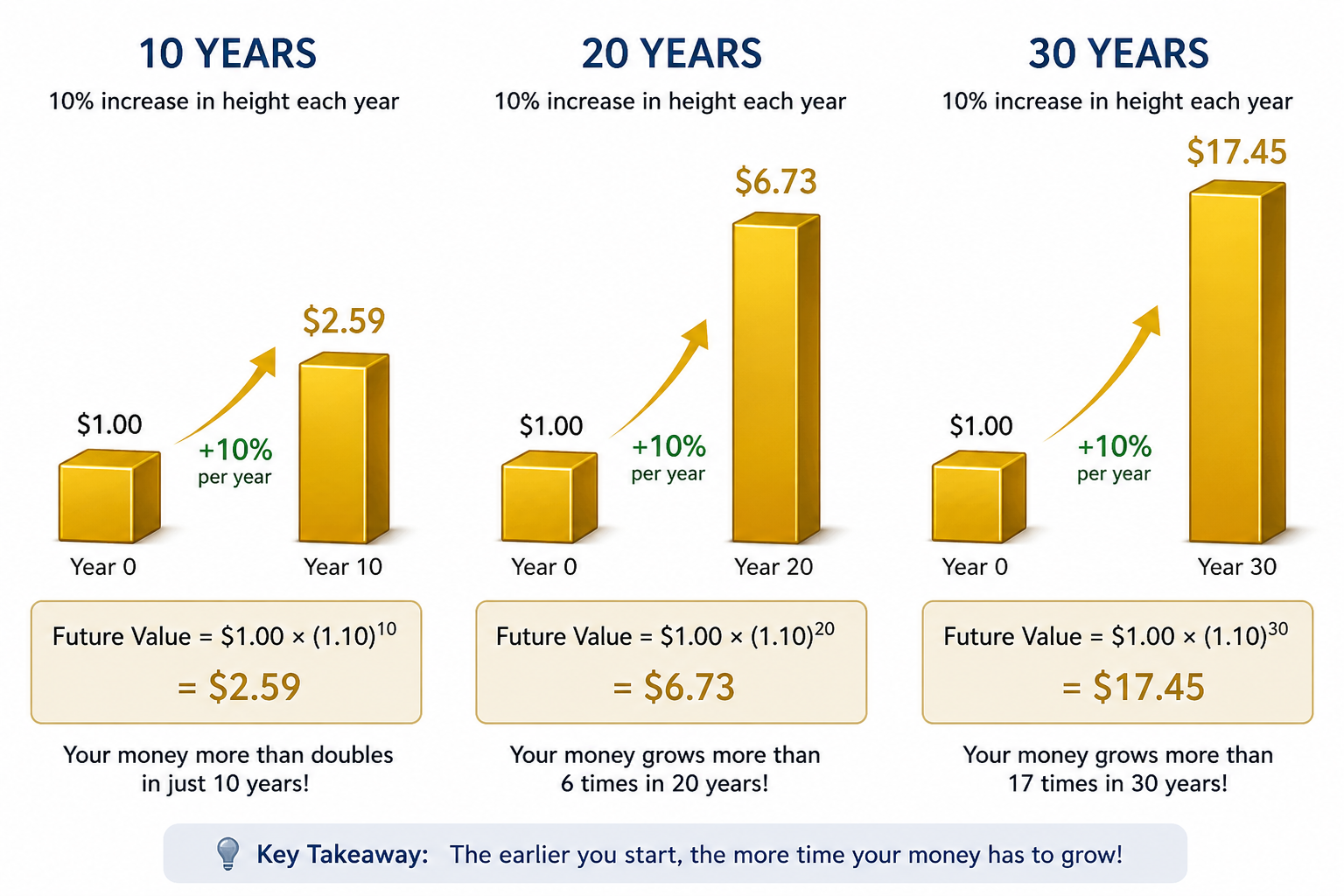
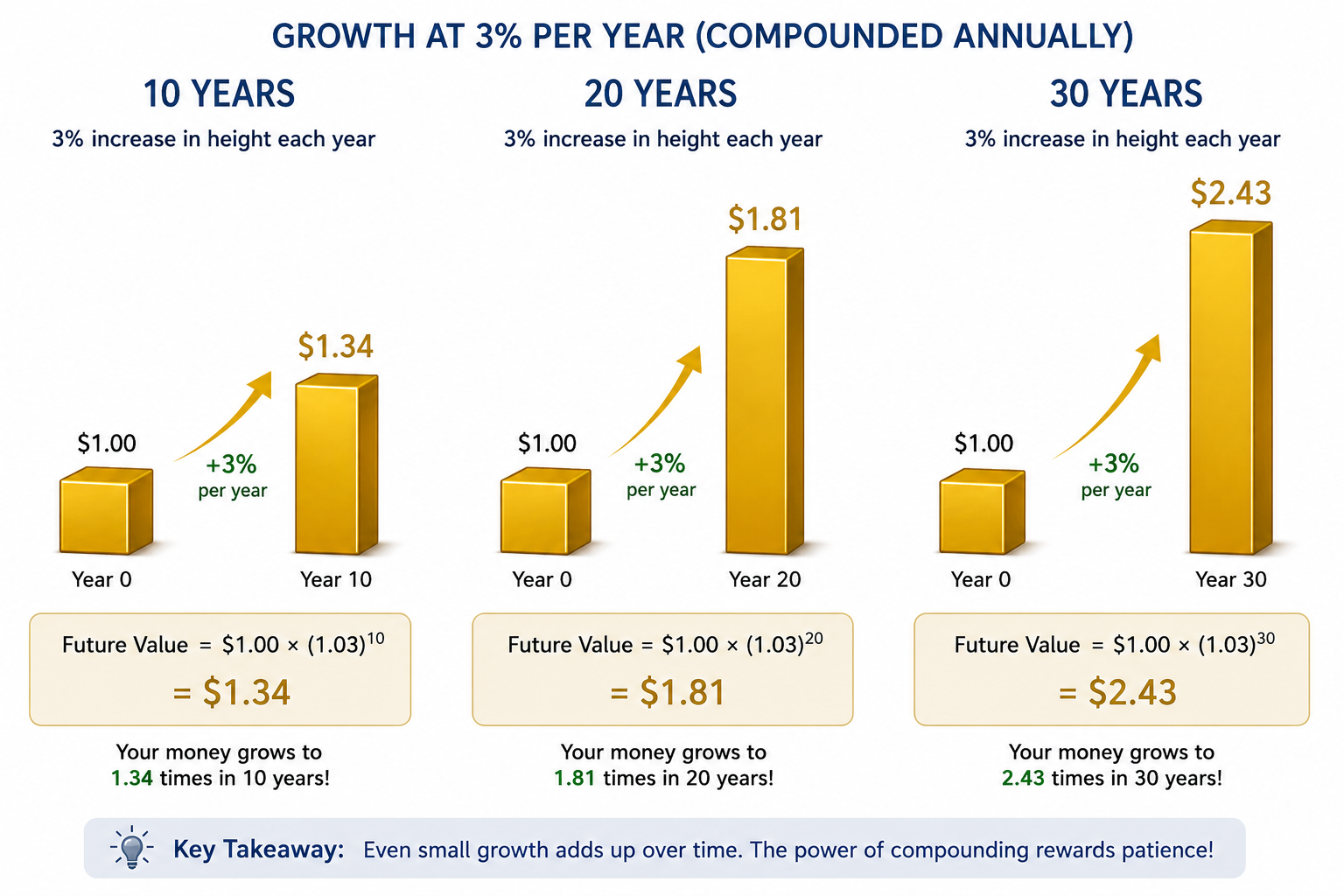
Time + Rate: Why Both Matter
Start with the same $1.00. A higher return and a longer holding period create much larger future values.
Glossary & Notation
- PV — Present Value: value at t=0 (today).
- FV — Future Value: value at t=n (future date).
- r — interest rate per period (year if annual, month if monthly).
- n — number of periods.
- PMT — constant payment per period (annuity/loan).
- Compounding — forward growth; Discounting — present valuation.
- APR — nominal annual %; EAR — effective annual %.
r is monthly, then n is in months and cash flows are monthly.Formulas & Excel (FIN301 cheat sheet)
Math Formulas
FV = PV *(1+r)^nPV = FV / ((1+r)^n)N = ln(FV/PV) / ln(1+r)Rate = (FV/PV)^(1/n) - 1
Annuity: solve for N
N = ln((FV/C)*r + 1) / ln(1+r)N = ln(1/(1-(PV/C)*r)) / ln(1+r)
Excel Formulas
- FV:
=ABS(FV(rate, nper, pmt, pv)) - PV:
=ABS(PV(rate, nper, pmt, fv)) - Rate:
=RATE(nper, pmt, pv, -fv) - Years (NPER):
=NPER(rate, pmt, pv, -fv) - Annuity payment:
=PMT(rate, nper, pv, -fv) - EAR:
=EFFECT(nominal_rate, npery) - APR:
=NOMINAL(effective_rate, npery)
Excel sign rules:
If results look negative, wrap the result in ABS(...).
If both PV and FV appear, use opposite signs (cash out vs cash in).
Quick Guide: PMT / APR / EAR / NPV
Chapter Add-Ons
PMT (Payment): Excel PMT(rate, nper, pv, [fv], [type]).
Ordinary annuity uses type=0 (end of period). Annuity due uses type=1 (beginning).
Ordinary Annuity (type = 0)
Blue marker jumps at the end of period → Excel type=0.
Annuity Due (type = 1)
Pink marker jumps at the beginning → Excel type=1.
APR — Annual Percentage Rate
Nominal yearly rate (no within-year compounding). Monthly rate = APR/12.
Excel (APR → EAR): =EFFECT(nominal_rate, npery)
EAR — Effective Annual Rate
True annual return including compounding.
EAR = (1 + APR/m)^m − 1
Excel: =EFFECT(APR, m) and =NOMINAL(EAR, m)
Quick Cheats: NPV, NFV, type
- NPV:
NPV(rate, CF1..CFn)discounts t=1..n. If there’sC0at time 0, doC0 + NPV(...). - NFV: compute PV first, then compound:
FV(rate, T, 0, -PV, 0). - Annuity timing:
type=0end-of-period;type=1beginning.
Videos
▶ Time Value of Money Made Simple — Excel & All-in-One TVM Calculator with Aya
Practice Questions (Q1–Q15 with interactive timelines)
Q1 — Find FV (compounding)
Invest $5,000 (PV) at 4% for 8 years. Find FV.
=ABS(FV(4%,8,0,5000)) • Math: 5000*(1+4%)^8Q2 — Find FV
Invest $3,000 (PV) at 3% for 12 years. Find FV.
=ABS(FV(3%,12,0,3000)) • Math: 3000*(1+3%)^12Q3 — Find PV (discounting)
Need $20,000 in 10 years; earn 3%. Find PV.
=ABS(PV(3%,10,0,20000)) • Math: 20000/(1+3%)^10Q4 — Find PV
Need $15,000 in 5 years; earn 2%. Find PV.
=ABS(PV(2%,5,0,15000)) • Math: 15000/(1+2%)^5Q5 — Find rate
PV=$5,000 grows to FV=$6,500 in 5 years. Find rate.
=RATE(5,0,5000,-6500) • Math: r=(6500/5000)^(1/5)-1Q6 — Find rate
PV=$8,000 grows to FV=$10,000 in 6 years. Find rate.
=RATE(6,0,8000,-10000) • Math: r=(10000/8000)^(1/6)-1Q7 — Find NPER
PV=$5,000 at 4% grows to $6,000. Find NPER.
=NPER(4%,0,5000,-6000) • Math: n=ln(6000/5000)/ln(1+0.04)Q8 — Find NPER
PV=$10,000 at 5% grows to $15,000. Find NPER.
=NPER(5%,0,10000,-15000) • Math: n=ln(15000/10000)/ln(1+0.05)Q9 — Monthly payment
Borrow $30,000 at 4% APR for 5 years. Find monthly payment.
=PMT(4%/12,5*12,30000,0) • Math: PMT=(r·PV)/(1-(1+r)^(-n)), r=0.04/12, n=60Q10 — Monthly payment
Borrow $20,000 at 3% APR for 10 years. Find monthly payment.
Timeline: Receive $20,000 at month 0; make 120 equal payments at the end of months 1–120. This is an ordinary annuity.
Math: r=3%/12=0.25% per month, n=10×12=120
PMT=(r×PV)/(1-(1+r)^(-n))=(0.0025×20000)/(1-(1.0025)^(-120))=$193.12
Excel: =ABS(PMT(3%/12,10*12,20000,0,0))
Answer: $193.12 per month.
Q11 — Annuity due versus ordinary annuity: Bridget and Jordan
Bridget saves monthly starting today (annuity due). Jordan saves monthly starting one month from today (ordinary annuity). Change any input and compare their ending balances.
Why Bridget’s first $150 is PMT—not PV
Watch on YouTubeWhy Bridget's first deposit is PMT—not PV: it is the first payment in a repeating monthly stream. Because it occurs at month 0, use type=1. Jordan uses type=0.
Q12 — EAR from an 18% APR compounded monthly
Change the APR or the number of compounding periods per year. The periodic rate, EAR, and timeline update automatically.
Q13 — EAR from an 18% APR compounded quarterly
Change the APR or compounding frequency to explore how within-year compounding changes EAR.
Interactive NPV/NFV Calculator
Use the calculator below to practice discounting cash flows to today and compounding value to a future date.
Open jufinance.com/nfv/ →Q14 — Project NPV and NFV
A project costs $100,000 today and generates $30,000, $40,000, $50,000, and $50,000 in Years 1–4. At a 10% required return, find NPV today and NFV at the end of Year 4.
Q15 — Compare another project using NPV and NFV
A second project costs $120,000 today and generates $25,000, $35,000, $45,000, and $70,000 in Years 1–4. At a 9% required return, find NPV today and NFV at the end of Year 4.
▶ Watch Aya’s Practice Q1–Q11 Walkthrough (7:49)
Aya explains each question while the blackboard shows the prompt, timeline, formula, solution, and Excel setup.
Watch on YouTube▶ Watch Practice Q12–Q15 — APR/EAR, NPV & NFV with Mei
Follow the blackboard questions, math, and Excel solutions. Enlarge the player or use its full-screen control.
Chapter 5 Concept Quizzes
Complete Quizzes 1–5 in order. Each quiz provides instant feedback and a short explanation.
Homework (due with the first midterm)
Answers are hidden — expand each item for the Excel setup and numeric answer.