FIN435 • Term Project — Efficient Frontier Group project • due with final
Project Files
Links below use relative filenames. Upload the files into the same folder as this page, then rename link targets if needed.
Required
FYI (examples)
- Sample outcome (from 2023)
- Efficient Frontier Excel template — direct equations (NO IFERROR) shows formulas
- Efficient Frontier template (FYI)
- Efficient Frontier sample report (Word)
Tip: Use the NO IFERROR version if you’re stuck — it reveals where the Excel formulas break so you can fix the reference.
Image
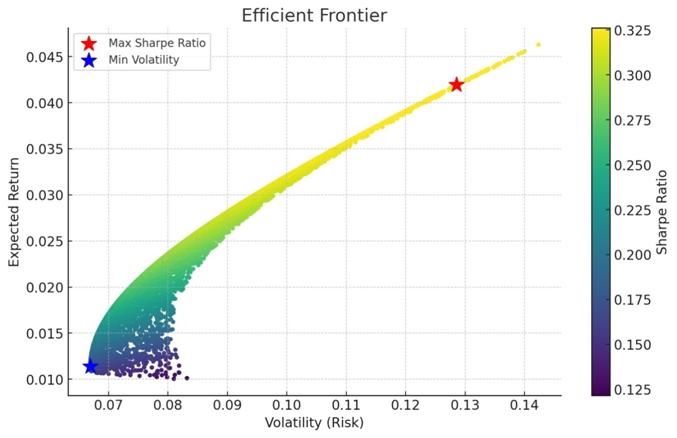
Note (important)
- The efficient frontier is the set of optimal portfolios that offer the highest expected return for a given level of risk.
- Visualizing the frontier helps you see the trade-off between risk and return and supports better decisions.
- If Solver returns no results, try adding constraints. Example: each weight is between 5% and 30%.
What your results should say
Key findings (example output)
1) Max Sharpe Ratio Portfolio (best risk-adjusted return)
- Expected Return: 4.19%
- Volatility (Risk): 12.85%
- Sharpe Ratio: 0.326
2) Min Volatility Portfolio (lowest risk)
- Expected Return: 1.14%
- Volatility (Risk): 6.70%
- Sharpe Ratio: 0.170
Takeaways
- The Efficient Frontier shows the best possible portfolios at different risk levels.
- Higher returns require accepting more risk.
- The Max Sharpe portfolio provides the best balance of return per unit of risk.
- The Minimum Volatility portfolio is safest, but returns are lower.
- Sharpe Ratio helps compare risk-adjusted returns — higher is better.
Plain-English explanation
The goal of the efficient frontier is to help investors identify the portfolio that provides the maximum return for a given level of risk, or the minimum risk for a given level of return. By plotting many portfolios, you can see the best risk–return trade-offs and choose the portfolio that matches your objectives.
🎥 Class recording — Efficient Frontier (Excel + Solver)
If you’re stuck, watch this first. It’s the full class walkthrough (data → returns → covariance → Solver → frontier plot).
Step-by-step checklist
Steps (do these in order)
- Data collection: monthly close prices for 8 securities (Yahoo Finance, or use the Stock Data Web App + Sheet).
- Monthly returns: compute month-to-month returns for each security.
- Statistical analysis: average monthly return + standard deviation (monthly).
- Annualize: annual return and annual volatility from monthly data.
- Correlation: build the 8×8 correlation matrix in Excel.
- Covariance matrix: convert correlations + σ’s into covariances (or use Excel’s covariance functions).
- Equally weighted portfolio: weights = 1/8 each → compute E[Rp] and σp.
- Solver analysis: minimize portfolio σp subject to (a) weights sum to 1, (b) weights bounds (e.g., 5%–30%), and (c) a target E[Rp].
- Efficient frontier: repeat Solver for many target returns; plot (σp, E[Rp]) points and connect the “upper-left” boundary.
- Write-up: summarize your best risk-adjusted portfolio (max Sharpe) and your lowest-risk portfolio (min volatility).
Formulas (8-stock portfolio)
Portfolio return
Portfolio Return = w1*r1 + w2*r2 + w3*r3 + w4*r4 + w5*r5 + w6*r6 + w7*r7 + w8*r8
Weights w1…w8 sum to 1, and r1…r8 are the (annualized) expected returns.
Portfolio risk
Portfolio Standard Deviation = √(wᵀΣw)
Σ is the 8×8 covariance matrix. This is the cleanest way to do the 8-stock calculation in Excel.
Expanded portfolio risk formula + covariance (what it is)
σp = √(
w12σ12 + w22σ22 + w32σ32 + w42σ42 + w52σ52 + w62σ62 + w72σ72 + w82σ82
+ 2w1w2ρ12σ1σ2 + 2w1w3ρ13σ1σ3 + 2w1w4ρ14σ1σ4 + 2w1w5ρ15σ1σ5 + 2w1w6ρ16σ1σ6 + 2w1w7ρ17σ1σ7 + 2w1w8ρ18σ1σ8
+ 2w2w3ρ23σ2σ3 + 2w2w4ρ24σ2σ4 + 2w2w5ρ25σ2σ5 + 2w2w6ρ26σ2σ6 + 2w2w7ρ27σ2σ7 + 2w2w8ρ28σ2σ8
+ 2w3w4ρ34σ3σ4 + 2w3w5ρ35σ3σ5 + 2w3w6ρ36σ3σ6 + 2w3w7ρ37σ3σ7 + 2w3w8ρ38σ3σ8
+ 2w4w5ρ45σ4σ5 + 2w4w6ρ46σ4σ6 + 2w4w7ρ47σ4σ7 + 2w4w8ρ48σ4σ8
+ 2w5w6ρ56σ5σ6 + 2w5w7ρ57σ5σ7 + 2w5w8ρ58σ5σ8
+ 2w6w7ρ67σ6σ7 + 2w6w8ρ68σ6σ8
+ 2w7w8ρ78σ7σ8
)
What is covariance (Cov)?
Covariance measures how two assets’ returns move together. Since you already know correlation:
Cov(i,j) = Corr(i,j) × σi × σj.
Also, the diagonal is:
Cov(i,i) = σi².
• If Corr(i,j) is positive, the two assets tend to move in the same direction → covariance is positive.
• If Corr(i,j) is negative, they tend to move in opposite directions → covariance is negative.
• Difference: correlation is standardized (between −1 and +1); covariance is in “return units” and depends on σ.
In Excel:
Cov(i,j) = Corr(i,j) * StDev(i) * StDev(j)
Using the covariance matrix avoids typing dozens of pairwise terms.
CML (Capital Market Line) — Optional
How to draw a tangent line from Rf to the Efficient Frontier
- Determine the risk-free rate (e.g., Treasury bill yield).
- Find the portfolio with the highest Sharpe ratio.
- The slope of the tangent line equals that Sharpe ratio.
- Draw the tangent line from Rf (y-axis) to the tangency point on the frontier.
This tangent line is called the Capital Market Line (CML). Any portfolio on the CML is a combination of the risk-free asset and the tangency portfolio.
8-Stock Efficient Frontier Tool interactive
Use this tool to visualize random portfolios + the efficient frontier for 8 assets.